MTF Fair Value Gap Map
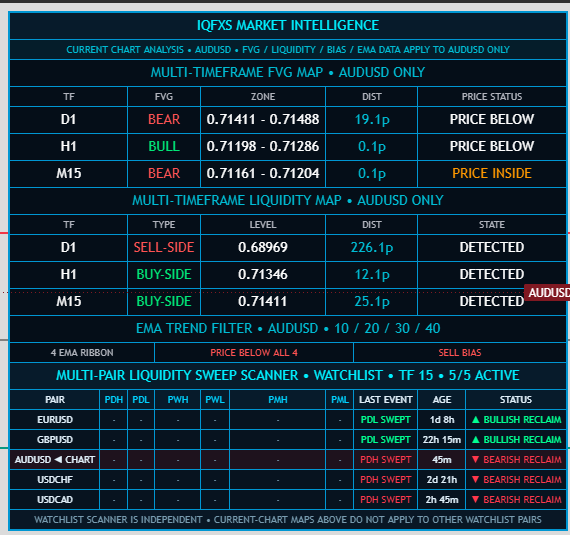
Tracks active bullish and bearish FVG context across selected timeframes for the symbol currently open on the chart.
CURRENT CHART
IQFXS brings the market information traders normally monitor separately into one configurable workspace: previous-day, week and month liquidity, fair value gaps, multi-timeframe liquidity mapping, rejection context, a four-EMA trend filter and independent multi-pair sweep surveillance.
MARKET INTELLIGENCE, NOT PREDICTIONS
IQFXS does not claim to know what price will do next. It organizes liquidity, imbalance, trend and sweep information so a trader can identify potential opportunities, wait for confirmation and decide whether a setup fits their own plan.
THE IQFXS FRAMEWORK
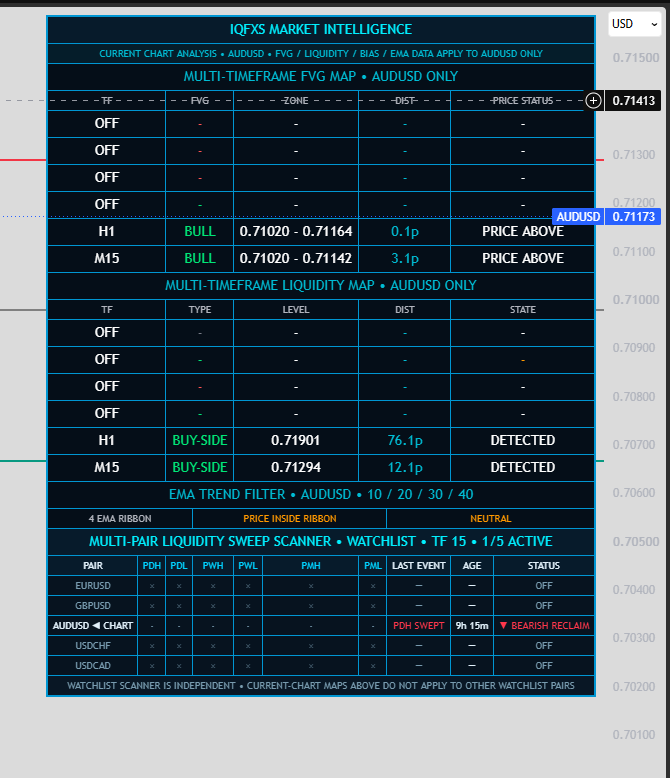
Every major dashboard module can be shown or hidden. Enabled information stays visible; disabled rows disappear and the dashboard automatically compresses.
Tracks active bullish and bearish FVG context across selected timeframes for the symbol currently open on the chart.
Maps selected-timeframe buyside and sellside liquidity, level distance and detection state for the current chart.
Independently monitors configured markets for PDH, PDL, PWH, PWL, PMH and PML sweep/reclaim events.
Configurable ribbon, default 10/20/30/40. Above all four = buy bias; below all four = sell bias; inside = neutral.
Chart-level buyside/sellside liquidity, HIGH REJECT / LOW REJECT context and liquidity-area visualization remain part of the framework.
Previous day, week and month highs/lows plus the previous-day 50% midpoint provide repeatable reference levels for liquidity and location.
Fair value gaps can remain visible directly on the chart while the dashboard summarizes multi-timeframe imbalance context.
The scanner retains the latest confirmed sweep event and its age instead of forcing the trader to catch the event at the exact candle.
Choose modules, timeframes and scanner pairs. The interface reflows around the information you actually want to monitor.
REFERENCE LIQUIDITY
Previous-period highs and lows are objective reference points. IQFXS makes them visible and monitors confirmed sweep/reclaim behavior around them.
CURRENT CHART INTELLIGENCE
If AUDUSD is open, the FVG Map, Liquidity Map, EMA Trend Filter and other chart-specific framework data describe AUDUSD only. Change the chart and this analysis follows the new symbol.
WATCHLIST INTELLIGENCE
The Sweep Scanner monitors its own watchlist independently of the current chart and records previous-day, week and month sweep events.
A POTENTIAL SETUP WORKFLOW
One way to use the framework is to begin with a previous-period liquidity event, then look for imbalance/displacement and trend confirmation. The sequence is context for a potential setup—not a guaranteed entry formula.
POTENTIAL LONG CONTEXT
A sweep/reclaim of a low can establish the event. A bullish displacement/FVG and price moving above the configured EMA ribbon can add confirmation before the trader evaluates a potential long.
POTENTIAL SHORT CONTEXT
The opposite sequence can be evaluated after a high is swept/reclaimed: bearish displacement/FVG, price below the EMA ribbon, then trader-defined entry and risk management.
SEE IQFXS IN ACTION
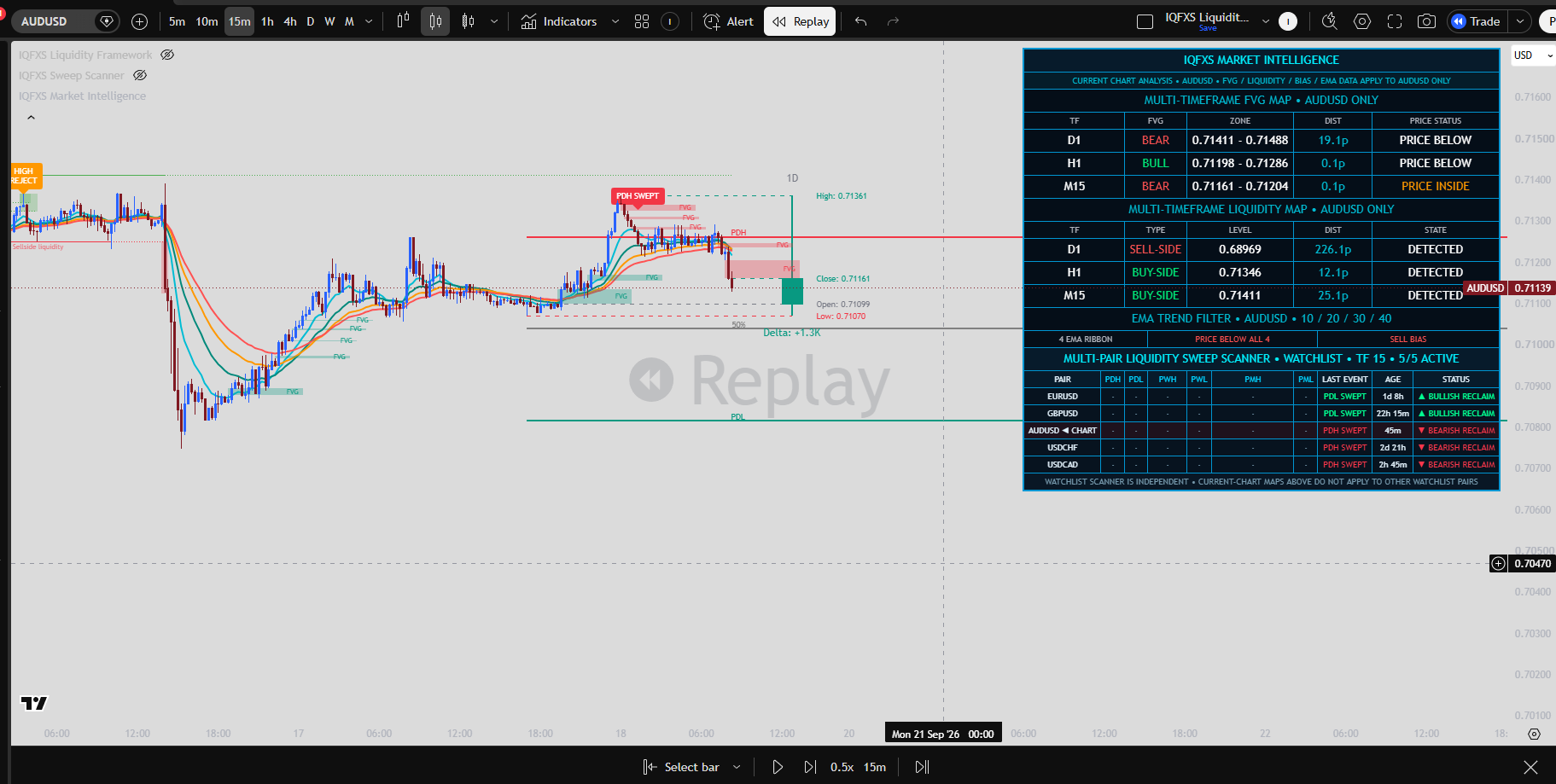
This Replay example shows the kind of sequence IQFXS is designed to organize: a liquidity event appears first, while other modules continue updating independently as price develops.
Illustrative mock TradingView Replay walkthrough created from an IQFXS chart screenshot. It explains the indicator workflow; it is not live execution, a trade recommendation, or guaranteed performance.
PRODUCT WALKTHROUGH
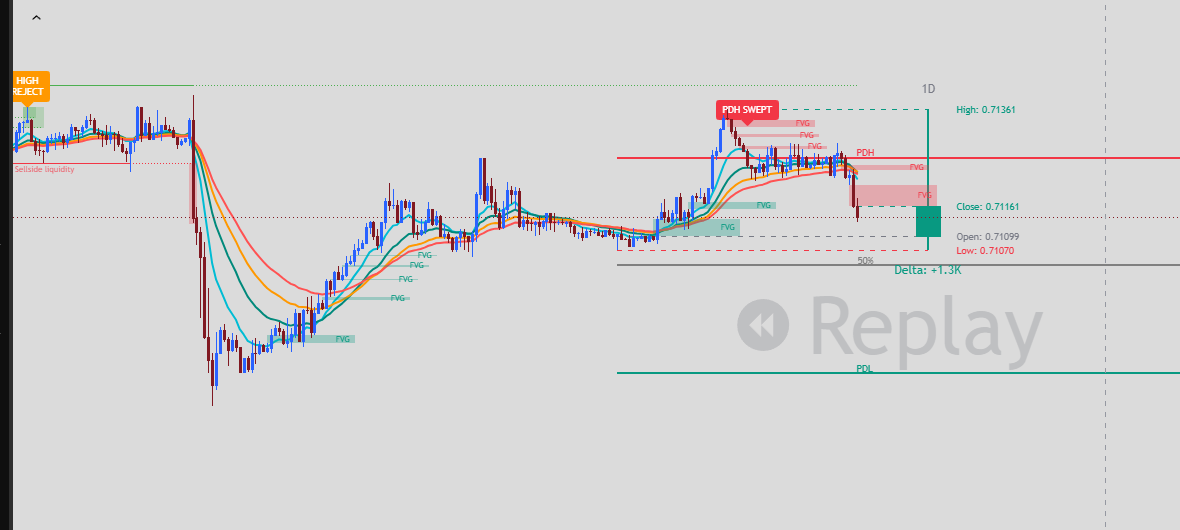
CHART CONTEXT
The chart remains the working surface while the dashboard summarizes the context around it.
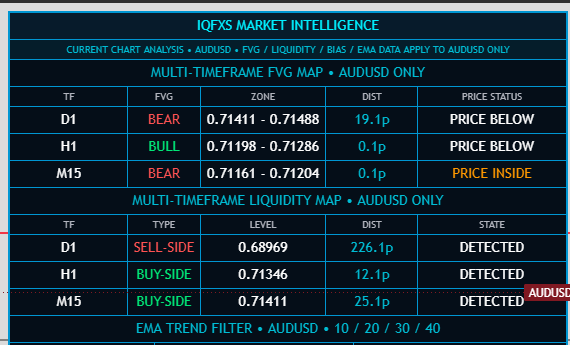
CURRENT CHART MAPS
These maps apply only to the symbol currently open on TradingView, preventing watchlist data from being confused with chart-specific analysis.
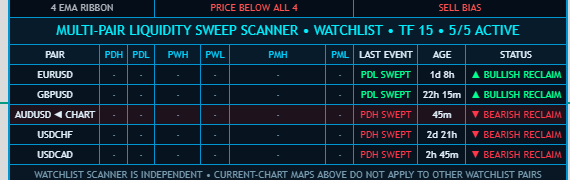
WATCHLIST SCANNER
Monitor configured markets for daily, weekly and monthly sweep/reclaim events while you remain on a different chart.
YOUR WORKSPACE
Enable only the modules, timeframes and scanner pairs you need. Disabled rows consume zero visible space, so IQFXS automatically compresses around your selections.
FULL VIEW
FOCUSED VIEW
WHAT IQFXS IS — AND ISN'T
Market intelligence
Liquidity visualization
Multi-timeframe context
Trend filtering
Multi-pair surveillance
A trader decision-support framework
A crystal ball
A guaranteed entry system
A profit guarantee
Financial or investment advice
An automated decision maker
A replacement for risk management
ACCESS
Launch pricing will be announced when subscription provisioning and TradingView access management are finalized.
MONTHLY
Flexible monthly access to the IQFXS TradingView framework.
Coming soonANNUAL
Annual access with launch pricing to be announced.
Coming soonFAQ
No. IQFXS identifies and organizes conditions such as liquidity sweeps, fair value gaps, mapped liquidity and EMA bias. A trader decides whether those conditions form a valid entry under their own strategy and risk rules.
With the default four-EMA filter, price above all four configured EMAs is classified as buy bias, below all four as sell bias, and price inside the ribbon as neutral. It is a trend filter, not a guaranteed entry signal.
No. Those maps apply to the current TradingView chart only. The Multi-Pair Sweep Scanner is the independent watchlist component.
The scanner can monitor Previous Day High/Low, Previous Week High/Low and Previous Month High/Low sweep/reclaim events for configured symbols.
Yes. Major dashboard modules, selected timeframes and scanner symbols can be disabled. The dashboard dynamically compresses so disabled rows do not consume visible space.
No. Financial markets are uncertain and losses can occur. IQFXS is an analytical decision-support tool and does not guarantee any market outcome or trading result.
RISK DISCLOSURE
Trading and investing in financial instruments involves substantial risk of loss and is not suitable for every investor. You may lose some or all of your invested capital. IQFXS is an analytical and educational tool designed to assist users in identifying and evaluating market conditions and potential trading opportunities. It does not predict future market movements, guarantee profitable trades, or eliminate trading risk. Nothing provided by IQFXS constitutes financial, investment, legal, or tax advice. Users remain solely responsible for their trading and investment decisions. Past performance and historical market behavior are not guarantees of future results.